Picking the wrong platform early on is the kind of mistake that costs you months, sometimes years.
You launch your site on WordPress because it's quick and familiar. Then the traffic picks up, the plugin conflicts start, the page speed drops, and suddenly you're paying a developer to undo decisions that made sense six months ago. Or you go the other route: you hire a Laravel team for a simple blog, burn through your budget, and go live six months later than planned.
Neither platform is wrong. But using the wrong one for the wrong project? That's where things get expensive.
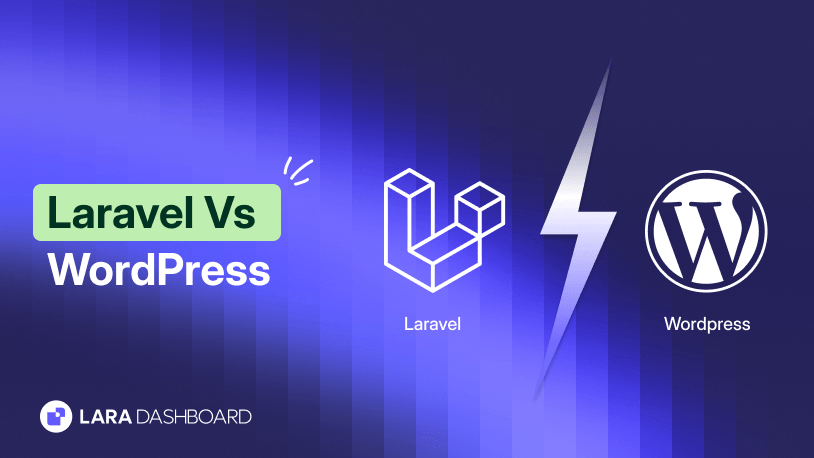
The Laravel vs WordPress debate has been going on for years, and now it's more relevant than ever. More businesses are making serious platform decisions, not just building a site, but building a foundation. So the question isn't which one is more popular. The question is which one actually fits what you are building.
This guide breaks it down without the marketing fluff. You'll walk away knowing exactly what each platform is built for, where each one falls short, and how to make the call for your specific situation.
Laravel and WordPress - What Are They? A Quick Primer
Before you compare them, you need to understand what you're actually comparing. Because Laravel and WordPress are not the same type of tool.
WordPress started as a blogging platform in 2003. Matt Mullenweg built it so that regular people — not developers — could publish content on the web. It worked. Today, WordPress powers over 43% of all websites on the internet. It's a Content Management System (CMS), which means its job is to help you create, manage, and publish content without writing code.
Laravel is a different animal entirely. Taylor Otwell released it in 2011 as a PHP framework for developers who needed a cleaner, more structured way to build web applications. It follows the MVC (Model-View-Controller) pattern, and it gives developers full control over how an application is built. Laravel has over 82,000 stars on GitHub — one of the most loved frameworks in the PHP ecosystem.
Here is the simplest way to think about this: WordPress is a ready-built house. You move in, rearrange the furniture, and it works. Laravel is a plot of land with the best building materials available. You design the house yourself, from the ground up.
Neither is better in absolute terms. They solve different problems. And once you understand that, the rest of this comparison becomes a lot clearer.
The Laravel framework vs WordPress distinction comes down to this: WordPress gives you a working product out of the box; Laravel gives you the tools to build any product you can imagine.
Laravel vs WordPress: Core Differences at a Glance
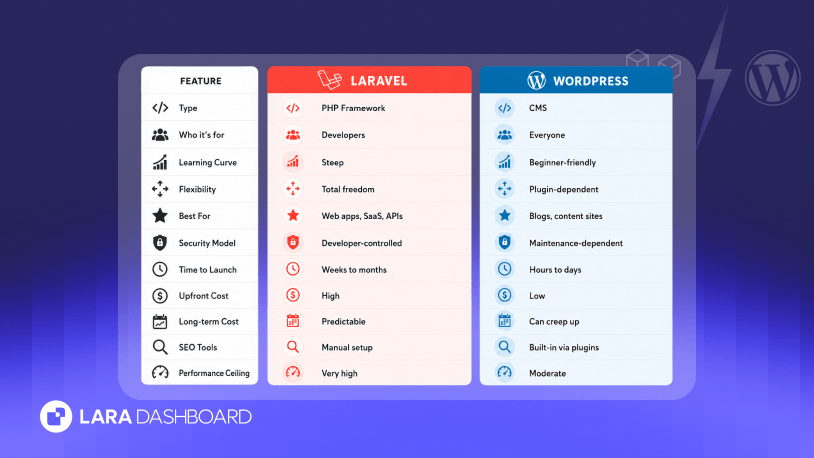
Here's a side-by-side look before we go deeper:
| Feature | Laravel | WordPress |
|---|---|---|
| Type | PHP Framework | Content Management System (CMS) |
| Who It's for | Developers | Everyone |
| Learning curve | Steep — requires PHP, MVC, CLI knowledge | Gentle — no coding required to get started |
| Flexibility | Total freedom over architecture and logic | Flexible within the CMS structure |
| Customaization | Build anything from scratch | Themes, plugins, Gutenberg blocks |
| Best use case | SaaS, web apps, APIs, enterprise platforms | Blogs, content sites, small eCommerce |
| Security model | Developer-controlled, built-in protections | Plugin-dependent, requires active management |
| Time to launch | Longer — requires full development | Fast — can go live in hours |
| Upfront cost | Higher (developer hours) | Lower (hosting + a theme) |
| Lng-term cost | More predictable | Can creep up with plugin licenses and maintenance |
| SEO tools | Manual setup required | Built-in via plugins like Yoast or RankMath |
| Performance ceilling | High — fine-tuned at every layer | Depends on hosting, plugins, and optimization |
This table is a starting point. The real differences show up when you dig into performance, security, scalability, and cost — which is exactly what the next sections cover.
One thing worth noting right here: WordPress vs Laravel is not really a head-to-head race. It's more like asking whether you need a sedan or a truck. The right answer depends entirely on where you're going.
1. Laravel vs WordPress - Performance

Speed matters more than ever in 2026. Google uses page experience as a ranking signal, and users leave a site if it takes more than 3 seconds to load. So when you are choosing between Laravel and WordPress, performance is not a small detail.
The WordPress Performance Story
WordPress works out of the box, but it also loads a lot of things you may not need. Every plugin you install adds code that runs on every page request. A typical WordPress site has 20 to 30 plugins active. Each one adds database queries, HTTP requests, or PHP processing in the background. Most users never see this happening, but the server does.
This does not mean WordPress is slow. A well-optimized WordPress site on good hosting with a proper caching plugin (like WP Rocket or LiteSpeed Cache) and a CDN can score very well on Core Web Vitals. Managed hosting providers like Kinsta and WP Engine are specifically designed to squeeze performance out of WordPress.
The problem shows up at scale. When traffic spikes, or when the site grows to hundreds of pages with complex queries, WordPress starts to struggle. At that point, you are adding more plugins to fix performance issues caused by other plugins. It becomes a cycle.
The Laravel Performance Story
Laravel starts lean. You only build what your application needs. There is no plugin bloat, no unnecessary database calls running in the background, no third-party code loading on every request. Developers control every layer of the stack.
This means Laravel applications can be fine-tuned for performance in ways WordPress simply cannot match. Query optimization, custom caching logic, queue management for heavy tasks, and efficient API responses are all in the developer's hands. For large-scale systems, Laravel often performs better because of this architectural control.
Laravel vs WordPress Performance: The Verdict
For a blog, a portfolio, or a marketing site, WordPress is fast enough. With decent hosting and basic optimization, you will have no performance issues.
For a SaaS product, a high-traffic web application, or a platform that processes complex data, Laravel wins. The performance ceiling on a well-built Laravel app is significantly higher because nothing is hidden from the developer.
2. Laravel vs WordPress - Security

Security is one of the most misunderstood parts of this comparison. You will often hear that "WordPress is insecure." That is not entirely accurate. But there is a real reason people say it.
Why WordPress Gets a Bad Reputation for Security
WordPress core is actually secure. The issue lies in plugin choices and lack of updates. WordPress powers over 43% of the internet, which makes it the biggest target for hackers. When you are that popular, attackers invest serious time finding vulnerabilities.
Most WordPress hacks happen through three doors: outdated plugins, poorly coded third-party themes, and weak admin passwords. A plugin that has not been updated in two years could have a known vulnerability that anyone can exploit. And because most WordPress users install plugins without vetting them thoroughly, this is a very common problem.
The second issue is that WordPress requires ongoing attention. You need to update the core, update every plugin, and update your theme regularly. Miss a few updates, and you are exposed. Many site owners do not realize this until something goes wrong.
How WordPress Handles Security Well
WordPress does have a dedicated security team. Major vulnerabilities in the core get patched fast. There is also a large ecosystem of security plugins like Wordfence and Solid Security that add firewalls, login protection, and malware scanning.
If you are on managed WordPress hosting, your host handles a lot of this for you. For most websites, a properly maintained WordPress installation is secure enough.
How Laravel Approaches Security
Laravel has built-in CSRF (Cross-Site Request Forgery) protection, SQL injection prevention, and secure authentication through Laravel Sanctum and Passport. These are not optional add-ons. They are baked into the framework.
Developers who build on Laravel control the entire security architecture. There are no third-party plugins adding unknown code to your application. Every dependency is chosen deliberately. Every database query goes through Eloquent ORM, which protects against SQL injection by default.
Laravel vs WordPress security comes down to this: Laravel puts security in the developer's hands by design. WordPress puts it in the site owner's hands through maintenance habits.
The Verdict on Laravel vs WordPress Security
For a content site or small business website, WordPress is secure enough as long as you keep everything updated and use a reputable host.
For an application that handles sensitive user data, financial transactions, or proprietary business logic, Laravel gives you a more controlled and predictable security environment.
There are fewer attack surfaces because there are fewer moving parts you did not build yourself.
3. Ease of Use and Learning Curve

This is the section where WordPress wins clearly, and there is no debate about it.
WordPress is Built for Everyone
You can install WordPress, pick a theme, and have a live website in under an hour. No code. No terminal. No configuration files. The dashboard is visual and straightforward. You add pages through a drag-and-drop editor. You publish blog posts the same way you write a Google Doc.
This is genuinely useful for a huge number of people. A small business owner who wants to manage their own website. A freelance writer running a blog. A nonprofit updating their event page. None of these people need to understand PHP or databases. WordPress makes the web accessible to them.
The plugin library extends this further. Need a contact form? Install a plugin. Need an online store? Install WooCommerce. Need an SEO tool? Install Yoast. Most of these take five minutes and require no code.
WordPress wins for beginners. With a simple dashboard, visual editors, and free plugin integration, even non-developers can set up a basic website or eCommerce site.
Laravel Requires Real Technical Knowledge
Laravel is a developer tool. To use it productively, you need to know PHP reasonably well, understand how MVC architecture works, be comfortable using Composer (PHP's package manager) from the command line, and have some familiarity with databases and migrations.
If you are a beginner, Laravel will feel overwhelming at first. The learning curve is real. But for developers who work through it, Laravel becomes one of the most enjoyable frameworks to build with. The code is clean, the documentation is excellent, and the tooling (like Laravel Forge, Vapor, and Horizon) makes managing applications much smoother.
With a steeper learning curve, Laravel requires deep knowledge of PHP, back-end development, and MVC concepts, making it ideal for experienced developers who need structure and control for building complex applications.
The Hidden Cost of WordPress's Simplicity
Here is something worth thinking about. WordPress's ease of use comes with a trade-off. The more you rely on plugins for functionality, the more dependencies you introduce. Each plugin is code written by a third party that you have not reviewed. Over time, plugin conflicts, performance slowdowns, and maintenance overhead quietly add up.
Many developers who start projects on WordPress end up spending significant time fighting the platform rather than building on top of it. At some point, the convenience of the beginning becomes the technical debt of the future.
This is not a reason to avoid WordPress for the right projects. But it is something to factor in before you choose it just because it is easier to start with.
4. Flexibility and Customization

Flexibility means different things depending on who you ask. For a blogger, flexibility means being able to change the site's look without touching code. For a developer building a SaaS product, flexibility means having zero restrictions on how the application behaves. Both definitions are valid. The problem is that WordPress and Laravel satisfy these two definitions very differently.
How WordPress Handles Customization
WordPress gives you a large toolkit to work with. There are over 59,000 free plugins in the official WordPress repository, plus thousands more available through third-party marketplaces. Themes give you design control. Gutenberg blocks let you build complex page layouts visually. Page builders like Elementor or Bricks Builder push this even further.
For most websites, this is more than enough. You can build a professional-looking, feature-rich website without writing a single line of code. And if you do know some PHP or CSS, you can customize further by adding code snippets or building a child theme.
The limitation appears when your project needs something that does not fit neatly into the WordPress structure. Custom database relationships, complex business logic, non-standard user flows, real-time features — these things are either difficult or messy to build inside WordPress. You end up writing code that works around the CMS rather than with it. That friction adds up.
How Laravel Handles Customization
Laravel gives you nothing out of the box except a solid framework to build on. That sounds like a disadvantage, but for developers, it is the whole point. You design the database structure. You decide how users are authenticated. You control how data flows through the application. There are no pre-existing patterns forcing your hand.
This level of control is exactly what complex projects need. If your application has custom workflows, multi-tenant architecture, or business logic that does not fit a standard mold, Laravel lets you build precisely what you need without workarounds.
Laravel offers complete freedom to build custom applications aligned to business logic. With no unnecessary bloat, developers can build complex websites with all necessary integrations.
WordPress vs Laravel on Customization: Where the Line is
Think of it this way. WordPress customization works inside a defined space. That space is large, and most projects fit inside it comfortably. Laravel customization has no defined space. You build the space yourself.
If your project fits within what WordPress can do with themes and plugins, WordPress will get you there faster and at a lower cost. If your project requires architecture that WordPress was not designed for, forcing it into WordPress will slow you down and create problems later. That is where Laravel makes far more sense.
5. Scalability: Which One Grows With Your Business?

Scaling WordPress
Scaling Laravel
The Scalability Verdict
6. SEO Capabilities

A lot of people assume WordPress is the only real option if SEO matters to them. That assumption is mostly right for content-driven sites, but it deserves a more complete explanation.
Why WordPress Has a Natural SEO Advantage
WordPress was built for content, and content is the core of SEO. The platform handles the basics well out of the box: clean URLs, categories, tags, and a structure search engines understand.
Where WordPress really pulls ahead is the plugin ecosystem. Yoast SEO and RankMath are two of the most powerful SEO tools available on any platform. They guide you through optimizing every page, generate XML sitemaps automatically, handle meta tags, structured data, canonical URLs, and Open Graph tags. For someone who is not an SEO expert, these tools do a lot of the heavy lifting.
WordPress also makes it easy to publish content consistently, which is one of the most important factors for long-term organic rankings. Blog management, categories, internal linking, and content scheduling are all built into the workflow.
Where Laravel Stands on SEO
Laravel has no built-in SEO tools. Out of the box, you get none of the things WordPress plugins handle automatically. If you want an XML sitemap, you build it. If you want structured data, you add it manually. Meta tag management, Open Graph, robots.txt configuration — all of this requires deliberate development work.
This sounds like a big disadvantage, and for teams without dedicated developers, it is. But for teams that do have development resources, this is not a blocker. Laravel packages like Spatie's Laravel SEO handle the technical SEO layer cleanly.
And because developers control the entire application, technical SEO decisions like URL structure, page speed optimization, server-side rendering, and response headers can be implemented exactly as needed.
The One Area Where Laravel Has an Edge
Page speed is a confirmed Google ranking factor. And a well-built Laravel application will almost always be faster than an equivalent WordPress site. This matters for SEO more than most people realize. A faster site means better Core Web Vitals scores, which means a better chance of ranking.
So while WordPress gives you better content SEO tools out of the box, Laravel gives you a performance foundation that supports stronger technical SEO at scale.
The SEO Verdict
If your primary goal is publishing content and ranking for informational keywords, WordPress wins. The tools are there, the workflow supports it, and you do not need a developer to manage it day to day.
If you are building a web application where technical SEO matters more than content volume, Laravel can absolutely compete. It just requires more upfront development to get the SEO layer right.
7. Laravel vs WordPress - Cost Comparison
Cost is usually the deciding factor for early-stage projects and small businesses. But the sticker price of either platform does not tell the full story. You need to think about what it costs to start, what it costs to maintain, and what it costs when things go wrong.
The Cost of Starting with WordPress
WordPress itself is free. The software costs nothing. You pay for hosting, which can start as low as $5 to $10 per month on shared hosting. A premium theme runs anywhere from $30 to $100 as a one-time purchase. A few essential plugins might cost $50 to $200 per year combined.
For a simple website, you can be fully operational for under $500 in the first year. That is genuinely affordable, and for small businesses and personal projects, this is a real advantage.
The costs start climbing as your needs grow. Premium plugins for forms, SEO, security, performance, and eCommerce can collectively run $500 to $1,500 per year. Better hosting for a growing site costs more. If you hire a developer to customize something, hourly rates for experienced WordPress developers range from $50 to $150 depending on where they are based.
The Hidden Costs of WordPress
Here is where many people get surprised. WordPress maintenance is an ongoing job. You need to update the core, plugins, and theme regularly. If an update breaks something (and it does happen), you need someone to fix it. Security monitoring, backups, and performance optimization all require either your time or someone else's money.
Plugin licensing is another silent cost. Many popular plugins charge annual renewal fees. Stop renewing and you lose access to updates and support. Over three to five years, a WordPress site can cost significantly more than the initial setup suggested.
The Cost of Building with Laravel
Laravel is also free and open source. But the development cost is not. You need a developer or a development team to build anything on Laravel. A basic Laravel web application built by a professional developer starts at $3,000 to $5,000 for something simple, and scales up quickly for anything complex.
This upfront cost is the biggest barrier for small projects. If your budget is tight, Laravel is simply not the practical choice.
Where Laravel becomes cost-efficient is in the long run. Once the application is built, you are not paying for plugin licenses. You are not dealing with plugin conflicts that require emergency developer hours. The codebase is yours, maintained by your team, and built to your exact specifications. Infrastructure costs are also more predictable because you are not relying on third-party tools to prop up performance.
Cost Comparison in Plain Terms
For a budget under $1,000, WordPress is your only realistic option between these two.
For a project with a $5,000 to $20,000 budget that needs to scale and last several years, the total cost of ownership for Laravel often works out to be more competitive than it initially appears.
For enterprise projects, the calculation usually favors Laravel because the cost of maintaining a complex WordPress setup with heavy customization tends to exceed the cost of a purpose-built Laravel application over time.
When to Choose Laravel vs WordPress
This is the section most people actually need. All the comparison points above lead to this decision. Here is a clear, practical breakdown.
Choose WordPress if
You are building a blog, news site, magazine, or content-heavy marketing website. WordPress was made for this, and it does it better than almost anything else.
You need to launch fast. WordPress lets you go from zero to live in a matter of days, not months. If speed to market matters more than custom functionality, this is where WordPress shines.
Your team is non-technical. If the people managing the website are editors, marketers, or business owners rather than developers, WordPress gives them a platform they can actually use without depending on a developer for every small update.
You are building a standard eCommerce store. WooCommerce handles most eCommerce use cases well. If you are selling products with standard checkout flows, WooCommerce is a solid choice.
Your budget is limited. A few hundred dollars gets a WordPress site live. No other platform in this comparison comes close on cost to launch.
Choose Laravel if
You are building a SaaS product, a web application, or a platform with custom user flows. Laravel is designed for this. WordPress is not.
Your application has complex business logic. Multi-step processes, custom database relationships, role-based permissions, API integrations, real-time features — these are all things Laravel handles naturally and WordPress handles awkwardly.
Security is non-negotiable. If you are handling sensitive user data, financial records, healthcare information, or any data where a breach has serious consequences, Laravel's developer-controlled security model gives you far more confidence than a plugin-dependent WordPress setup.
You need to scale significantly. If your growth projections involve tens of thousands of users, high transaction volumes, or complex data processing, building on Laravel from the start saves you from a painful migration later.
You are building an API or a headless backend. Laravel is one of the best PHP frameworks for building RESTful APIs. If your front end is built in React, Vue, or a mobile app, Laravel as the backend is a natural fit.
The Grey Area: When Neither is an Obvious Choice
Some projects sit in the middle. A growing eCommerce brand that started on WooCommerce but is hitting limits. A SaaS idea that needs to launch fast but also needs custom logic. A content platform that also has complex user accounts and dashboards.
In these cases, the right answer depends on your team's skills and your timeline. If you have strong Laravel developers available, go with Laravel from the start. If you need to validate an idea quickly on a tight budget, WordPress can get you there faster, with the understanding that a migration may be on the horizon.
Can You Use Both? The Headless Approach
This is a question more teams are asking in 2026, and the answer is yes, you can use both together.
The headless approach means using WordPress purely as a content management system — a back-end tool for editors to write and organize content — while a separate front end or application layer handles how that content is displayed and delivered. Laravel can serve as that application layer, consuming WordPress content through the REST API or WPGraphQL.
This setup gives you the best of both worlds in the right context. Editors get the familiar WordPress dashboard they are comfortable with. Developers get a Laravel application that is fast, flexible, and built the way they want it built.
It is not a simple setup. It requires more infrastructure, more development time, and a team that understands both platforms. But for large content operations that also need custom application logic, it is a legitimate architecture worth considering.
The headless trend is growing because teams are no longer willing to accept the trade-offs of a single monolithic platform. They want their content team and their engineering team to each work in an environment that suits them. WordPress plus Laravel, used this way, can deliver that.
Final Verdict: Laravel vs WordPress, Which is Better?
There is no single correct answer to the question of Laravel vs WordPress which is better, and anyone who gives you one without asking about your project first is not giving you useful advice.
Here is the honest summary.
WordPress is the right choice for content-driven websites, blogs, marketing sites, and standard eCommerce stores. It is fast to launch, affordable, and manageable by non-technical teams. For the majority of websites on the internet, WordPress is genuinely the right tool.
Laravel is the right choice when you are building an application, not a website. When your project needs custom logic, high security standards, a scalable architecture, and a development team that can build exactly what the business needs, Laravel delivers in ways WordPress simply cannot.
The mistake most people make is choosing based on familiarity rather than fit. WordPress is familiar to a lot of people, so it becomes the default. But familiarity is not the same as the right tool for the job.
There is no universal winner. If you need speed, simplicity, and lower cost, WordPress is the smarter choice. If you need control, scalability, and custom development power, Laravel is the better investment.
Think about what you are building a year from now, not just what you need to launch next month. That question will point you toward the right platform.