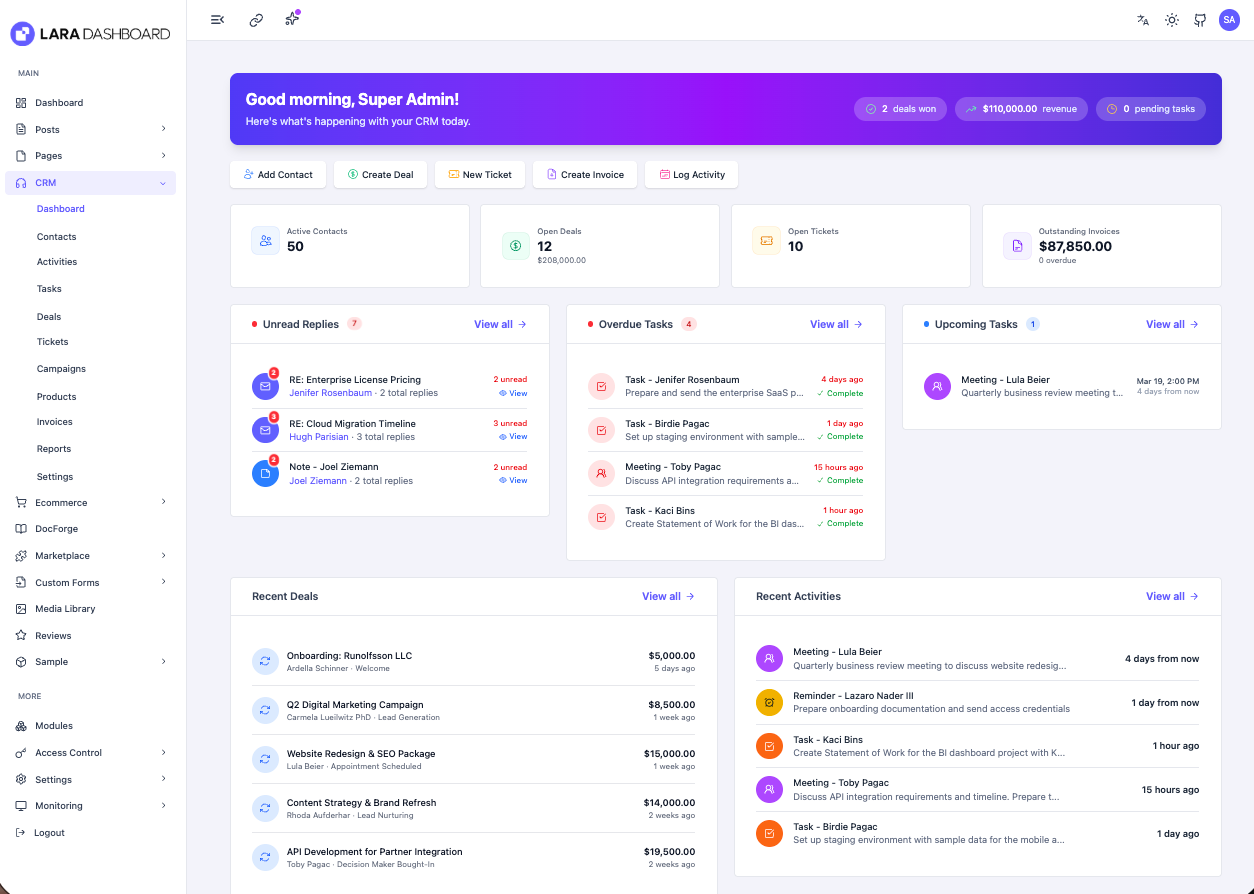
Most small teams do not need an enterprise CRM. They need to know who a lead is, what stage the deal is in, who follows up next, and whether support already answered. The Lara Dashboard CRM module covers exactly that, inside the same Laravel admin you already use for content, forms and email.
Disclosure: Lara Dashboard is our own Laravel CMS and admin. This post describes the CRM module as of November 2026 (CRM v1.4.5 on Lara Dashboard v1.5.1).
Contacts: one record per person
A contact holds the basics: name, email, phone, company, job title, website, lead source and a short summary. Each contact has a type, which starts as Lead by default, and an owner on your team. Deals, activities and tickets all link back to that one record, so you never reconcile three copies of the same email address.
Deals: pipelines you can actually work
Deals live in pipelines with stages you configure. Each deal has an amount, a win probability, an expected close date, an owner, a priority and a status of open, won or lost. The field that matters most day to day is the next follow-up date. Set it every time you touch a deal, and the CRM tells you when it is due.
Activities: the history of every relationship
Activities are how work gets logged against a contact. The module supports notes, emails, SMS, calls, meetings, tasks, follow-ups, reminders, schedules, transactions and feedback. Activities can be assigned to teammates, given a reminder date and marked complete.
Email activities can be sent straight to the contact, with CC, BCC and a reply-to address. Replies come back into the activity thread, so the conversation stays on the contact's timeline instead of in one person's inbox.
Tickets: support on the same contact
Support tickets sit in the same module. A ticket has a status, a priority (low, medium, high or urgent), a due date, an assignee, a category and a department, and it links to the contact who raised it. Sales can see that a customer has an open ticket before calling about a renewal, and support can see the deal before replying.
The daily briefing keeps follow-ups from slipping
A CRM only helps if someone looks at it. Lara Dashboard's daily briefing pulls the CRM checks into one list each morning:
- Stale deals with no recent activity
- Deal follow-ups due today
- Overdue activities and activities due today
- Unread replies on activity threads
- Overdue tickets and open tickets with no assignee
When everything is clear, it says so. When it is not, each item links straight to the records that need attention.
Works with AI agents through MCP
The CRM is exposed through the Lara Dashboard MCP server, so Claude or Cursor can list contacts, create deals, move stages, log activities and reply to tickets with your permissions. A practical loop: ask your agent for the daily briefing, review the new form leads, and have it create the contact and deal for you. Keep a human approval step on anything that emails a customer. Our post on Lara Dashboard MCP for Cursor and Claude covers setup.
When it fits, and when it does not
The CRM module is a good fit for agencies, SaaS teams and small businesses that want leads, deals and support next to their site and forms, in one Laravel app they control. It is a weaker fit if your sales team already lives in HubSpot or Salesforce all day, or if you need heavy marketing automation. Do not migrate a working CRM just to consolidate. Move when the sync work between tools costs more than it saves.
For the bigger picture of how forms, CRM and tickets share one contact record, read forms, CRM and support tickets in one Laravel stack.
FAQ
Can I turn the CRM off if I do not need it?
Yes. CRM is a module. You can enable or disable it like any other Lara Dashboard module.
Can I have more than one sales pipeline?
Yes. Deals belong to a pipeline and a stage, so you can run separate pipelines, for example one for new business and one for renewals.
Do I need a separate helpdesk tool?
For many small teams, no. Tickets with priorities, due dates, assignees and replies are built into the CRM module. Large support teams with SLAs across many channels may still prefer a dedicated helpdesk.
Get the CRM module
The CRM module is available in the Lara Dashboard marketplace. Install it, add your first contact and deal, and check tomorrow's daily briefing.